
Room door and waiting room screens in hospitals

Every screen in a hospital has its own job: the door monitor introduces the room, the waiting room screen informs and the lobby screen guides. This guide covers screen types, patient privacy, hardware and the IT groundwork.
Screens in a hospital do very different jobs. The small monitor beside a door introduces the room and the team responsible for it, the TV in the waiting room keeps patients informed and the lobby screen points visitors the right way. In an emergency, every screen needs to show the same message at once. This guide covers the screen types you find in a hospital, what each should show, patient privacy, hardware and the IT groundwork. The examples use a fictional hospital, "Örnek Hastanesi" (Sample Hospital).
Which screen goes where?
Each type of screen has its own audience, viewing time and content. The table sums up the screens in a typical hospital and what MIA can do with each today.
| Screen | What it shows | With MIA today |
|---|---|---|
| Waiting room | Announcements, health information, clock, weather | Available |
| Lobby and entrance | Departments, floors, visiting hours, scrolling notices | Available as content; touch wayfinding can be built on request |
| Elevator | Events and hygiene reminders on a portrait screen | Available |
| Cafeteria | Today's menu, menus that change by time of day | Available |
| Pharmacy | Queue numbers by day, on-duty pharmacies in the evening | The queue system's web display runs in a zone; deeper integration on request |
| Emergency announcement | Evacuation, drill or code messages on every screen | Available |
| Room door | Room number, responsible doctor, ward round times, visiting rules | A design configured for the hospital at installation, not a ready-made module |
Room door screens: what they show and how they are set up
Name plates and handwritten notes by the door go out of date every time a doctor or shift changes. A small screen can keep that information current: room number, ward, responsible doctor and specialty, ward round times, whether visits are allowed and the visiting rules.
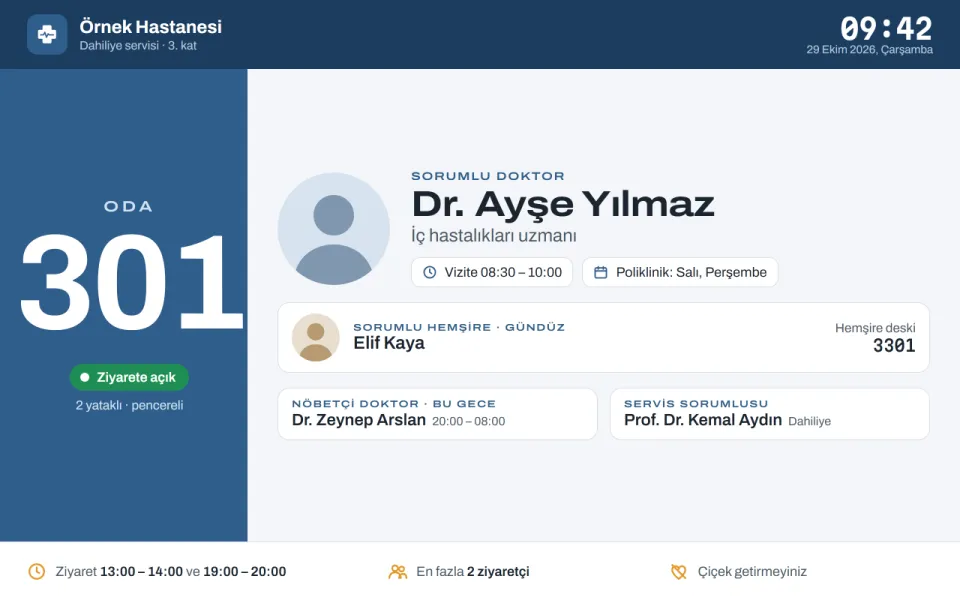
The image above is a sample design: the hospital, the room and the doctor (Dr. Ayşe Yılmaz) are fictional. It is worth being precise here. Editing doctor details room by room in the panel, showing the night doctor from the on-call rota and pulling data from the hospital information system (HBYS) are not a ready-made MIA module. That setup is configured and built for the project during installation, around the hospital's wards, on-call rota and data sources.
What is ready today is the screen itself. The monitor by the door is an ordinary MIA screen: it is paired, tagged (for example "kat:3" for the third floor), answers remote commands and keeps playing through outages. Fixed details such as the room number and ward name can already be shown as normal content.
What a room door screen should never show
- Patient names, or anything about a diagnosis or treatment.
- Text too small to read from a few steps down the corridor.
- Moving adverts or video. A door screen is there to inform, not distract.
Waiting rooms, lobbies and elevators
Waiting room
People watch the waiting room screen for a long time, so content should be varied and calm. Preparation notes before an examination, vaccination and screening reminders, visiting hours and hospital news can run in turn. A corner can carry a clock and a few days of weather, with a header band showing the hospital's logo, name, date and time. The server fetches weather data from MET Norway, so screens never need internet access.
Lobby and entrance
The lobby screen helps first-time visitors find their way: departments, floors, where the clinics and laboratory are, and visiting hours. This can be prepared as image or HTML content with a scrolling notice band beneath it. An interactive kiosk where visitors touch the screen to search for a department is not available today; it can be built for your installation if needed.
Elevator
Elevator screens are mounted in portrait and watched briefly, so short messages that can be read within a few floors work best. The 1080×1920 portrait information screen design is made for this. Wi-Fi often drops inside the car, but the Samsung Tizen package stores media on the screen itself, so playback carries on. In a real Wi-Fi outage test in an elevator, playback was not interrupted.
Cafeteria and pharmacy screens
The cafeteria screen is a menu board: breakfast and lunch menus switch automatically with time rules, and diet options can sit in their own zone. The player applies the rules using the server's clock, so screens switch on time even if the network drops.
The screen outside the pharmacy shows queue numbers during the day. If your queue ticket system has a web display, MIA shows it in a web page zone, with announcements in the next zone. A deeper data link with the queue system can be built on request. Once the pharmacy closes, a time rule switches the same screen to the list of on-duty pharmacies nearby. The list can be uploaded as an image each day or, if the source allows it, shown in a web page zone, which needs internet access on the screen. Add a weekday rule for weekends and nobody needs to touch the screen in the evening.
Emergency announcements on every screen
For evacuations, drills or code announcements, MIA keeps a separate emergency program ready. Switched on from the panel, it replaces normal playback straight away on all screens or on the ones you choose. Normal deployments go out gradually to spare the network, but emergency changes never wait. Switch it off and every screen returns to its usual program.
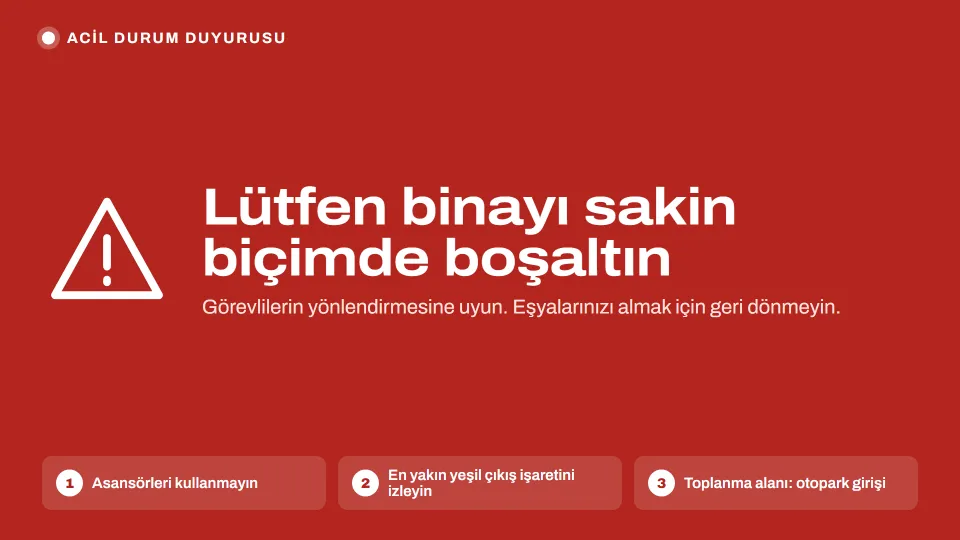
Prepare the emergency program in advance and test it during a drill. Who presses the button, which languages the message uses and who returns screens to normal belong in the hospital's emergency procedure. Automatic triggering from a fire alarm or emergency system is not available today; it can be built for your installation if needed.
Patient privacy and data protection
The most important rule for hospital screens is simple: no patient names on screen. That applies to room doors, waiting rooms and queue displays alike. Queue screens use numbers, and a door screen shows only the room, the team on duty and the rules.
- Data stays on the hospital's own server. Content, the screen list, users and reports never leave. The license activates offline and MIA never phones home.
- Staff names are personal data too. If doctors' or nurses' names appear on screen, the hospital's data protection team decides on notices and consent under KVKK or the rules that apply to you.
- Every change is recorded. The audit log records each change with its IP address, can be exported as CSV and is visible to admins only.
- Access follows roles. There is no default admin password, passwords are stored hashed with scrypt and login attempts are limited.
- Records have a lifetime. You can set how long play logs are kept.
The security and privacy page has more detail.
Hardware and network: an IT checklist
Hardware
- Room doors: small Android monitors on the door frame or wall. With a PoE model, one network cable carries both power and data. The MIA Player app starts on boot, and the optional device owner mode installs updates silently.
- Lobby, elevators and waiting rooms: Samsung professional signage displays (SSSP/Tizen) where screens stay on for long hours. The signed MIA Player package is installed with URL Launcher; each site needs a Samsung certificate, which MIA prepares. See the Samsung SSSP and Tizen page.
- Existing TVs: Samsung and LG Smart TVs from 2018 onwards work with their own browser, so you can start without new devices.
- Portrait screens: rotate either in the TV's settings or in MIA, never both.
Network and server
- Put screens on their own network segment (VLAN) and keep them off guest Wi-Fi.
- Use wired connections wherever possible; at room doors, PoE also simplifies cabling.
- Screens only need to reach the MIA server, not the internet. The server fetches weather, exchange rate and RSS data.
- Give screens fixed addresses through DHCP reservations and keep an inventory; the panel's screen installation date report helps keep it current.
- Put the server on a UPS. On a closed network, use local network mode by IP address; if outside access is needed, set up automatic HTTPS with your own domain.
- On Linux, backups are taken automatically. Copy backups to a disk outside the server too.
- Send offline screen alerts to IT by webhook or Telegram; a message also arrives when the screen comes back.
- One server is designed for about 100 screens, so plan servers early for larger sites.
The installation routes are described on the server options page.
Staff workflow
The technical setup is done once; the real work is keeping content current every day. Agree on roles from the start.
- Admin (Yönetici): usually IT. Pairs screens, creates users, manages settings and the emergency program.
- Editor (Editör): communications or public relations. Uploads content, edits programs and publishes changes.
- Viewer (İzleyici): managers or ward leads who see what is on air without changing it.
The flow is the same for every screen: content goes into a folder, the layout is set up in a program, the screen is linked to the program, and changes go live deliberately with one click from "Dağıtım bekleniyor" (pending deployment). Nothing reaches a screen by accident. Each deployment is a numbered record showing which screens confirmed it, and a screen that was offline picks up the update when it reconnects. Users are unlimited; the panel runs in a browser and its interface is in Turkish.
Tags make this easier: screens tagged "kat:3" receive only that floor's notices. The calendar shows campaign and notice dates in month, week and day views, and the signage report shows how many times each announcement played on each screen, which you can export as CSV to show that a health campaign was really on air.
Conclusion
A well-planned screen network takes pressure off the information desk, keeps waiting patients informed and reaches everyone at once in an emergency. It does not take a complex system: the right screen in each place, a clear privacy rule, a separate network and a team with clear responsibilities are enough. MIA runs waiting room, lobby, elevator, cafeteria and emergency announcement screens on the hospital's own server today, while room door screens are configured for your hospital as part of the installation. For all hospital scenarios, see the hospitals solution page.
Try MIA: 30-day trial license
Install it on your own server, pair your screens and use the whole panel for 30 days.
Get a trial license